Elevation

Overview

Elevation is the distance between two surfaces on the z-axis — how stacked elements read as closer or farther from the viewer.

Z-axis

The z-axis represents the perceived depth or stacking order of elements. It’s how we create visual hierarchy and depth on a flat screen. Elements with a higher z-axis value appear closer to the user, overlapping elements with lower values, thus creating a sense of layers and elevation. Think of it as how elements stack on top of each other, even though they’re all displayed on a 2D screen.

In dark mode we create elevation by using our color tokens.

bg-default
bg-level-01
bg-level-02
bg-level-03
bg-level-04
bg-level-05
Dark mode elevation
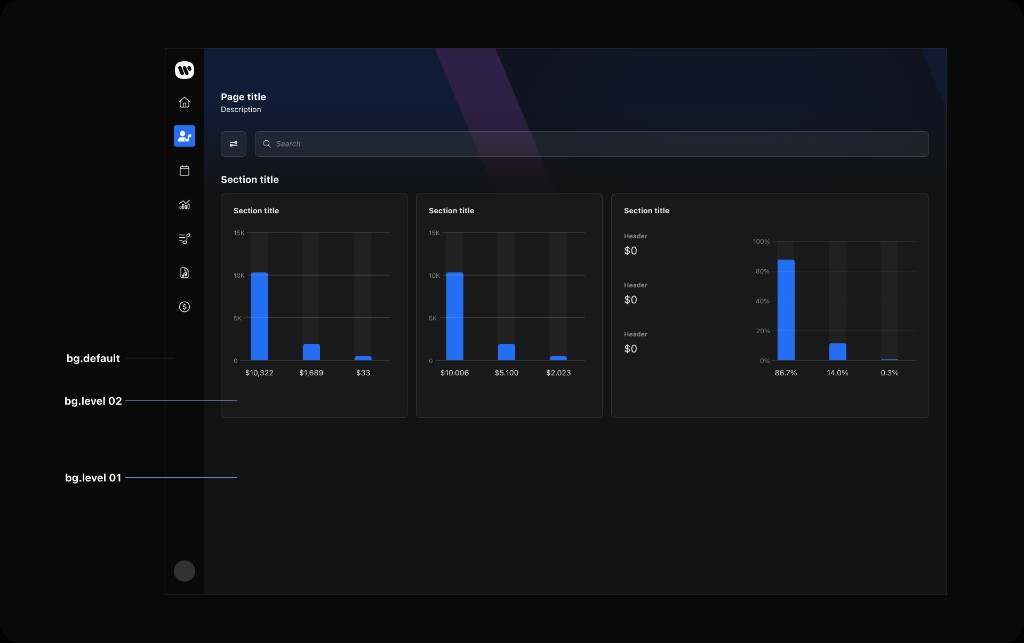
How we create elevation and a sense of hierarchy in dark mode:

bg-default
Token for side navigation bar.

bg-level-01
Token for main layout background.

bg-level-02 bg-level-03 bg-level-04 bg-level-05
Tokens are then used as surface colors to create elevation and visual hierarchy by stacking them sequentially.

Elevation in dark mode showing bg-default, bg-level-01, and bg-level-02 layers

In light mode, zeroheight documents additional shadow-based elevation (elevation-level-0103) for depth beyond flat fills. See zeroheight for light-mode specs.